
A drop-in replacement for UISegmentedControl mimicking the style of the segmented control used in Google Currents and various other Google products.
Features
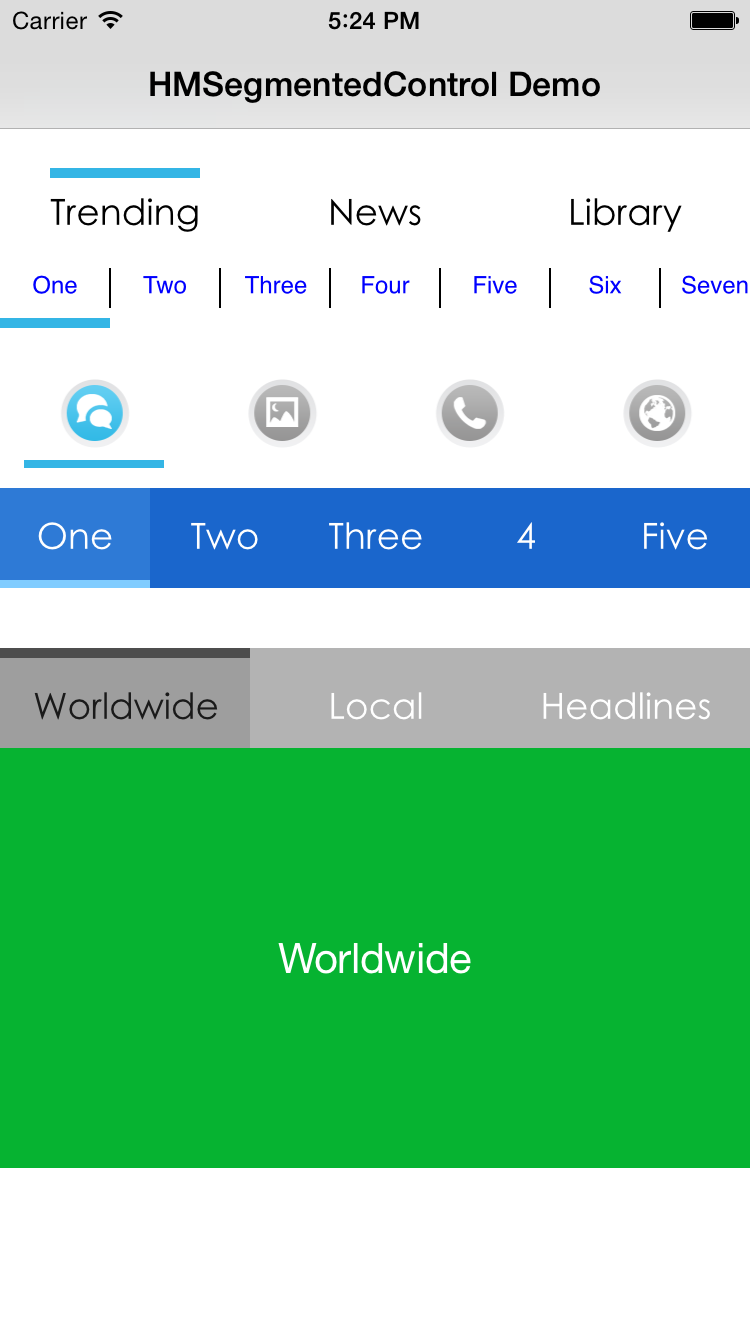
- Supports both text and images
- Support horizontal scrolling
- Supports advanced title styling with text attributes for font, color, kerning, shadow, etc.
- Supports selection indicator both on top and bottom
- Supports blocks
- Works with ARC and iOS >= 7
Usage
The code below will create a segmented control with the default looks:
HMSegmentedControl *segmentedControl = [[HMSegmentedControl alloc] initWithSectionTitles:@[@"One", @"Two", @"Three"]];
segmentedControl.frame = CGRectMake(10, 10, 300, 60);
[segmentedControl addTarget:self action:@selector(segmentedControlChangedValue:) forControlEvents:UIControlEventValueChanged];
[self.view addSubview:segmentedControl];
Included is a demo project showing how to fully customise the control.
Installation
CocoaPods
The easiest way of installing HMSegmentedControl is via CocoaPods.
pod 'HMSegmentedControl'
Old-fashioned way
- Add
HMSegmentedControl.handHMSegmentedControl.mto your project. - Add
QuartzCore.frameworkto your linked frameworks. #import "HMSegmentedControl.h"where you want to add the control.

Post a Comment